Product · Integrations & API

Integrations and API that connect Wantly to your stack

Wantly fits your stack, not the other way around. Pull from suppliers, sync with your CRM, ERP, e-commerce, accounting, and warehouse, and feed your resellers. Client data, products, prices, and orders flow automatically — with a full API for anything custom.

30-minute demo on your own stack. We connect everything for you during setup.
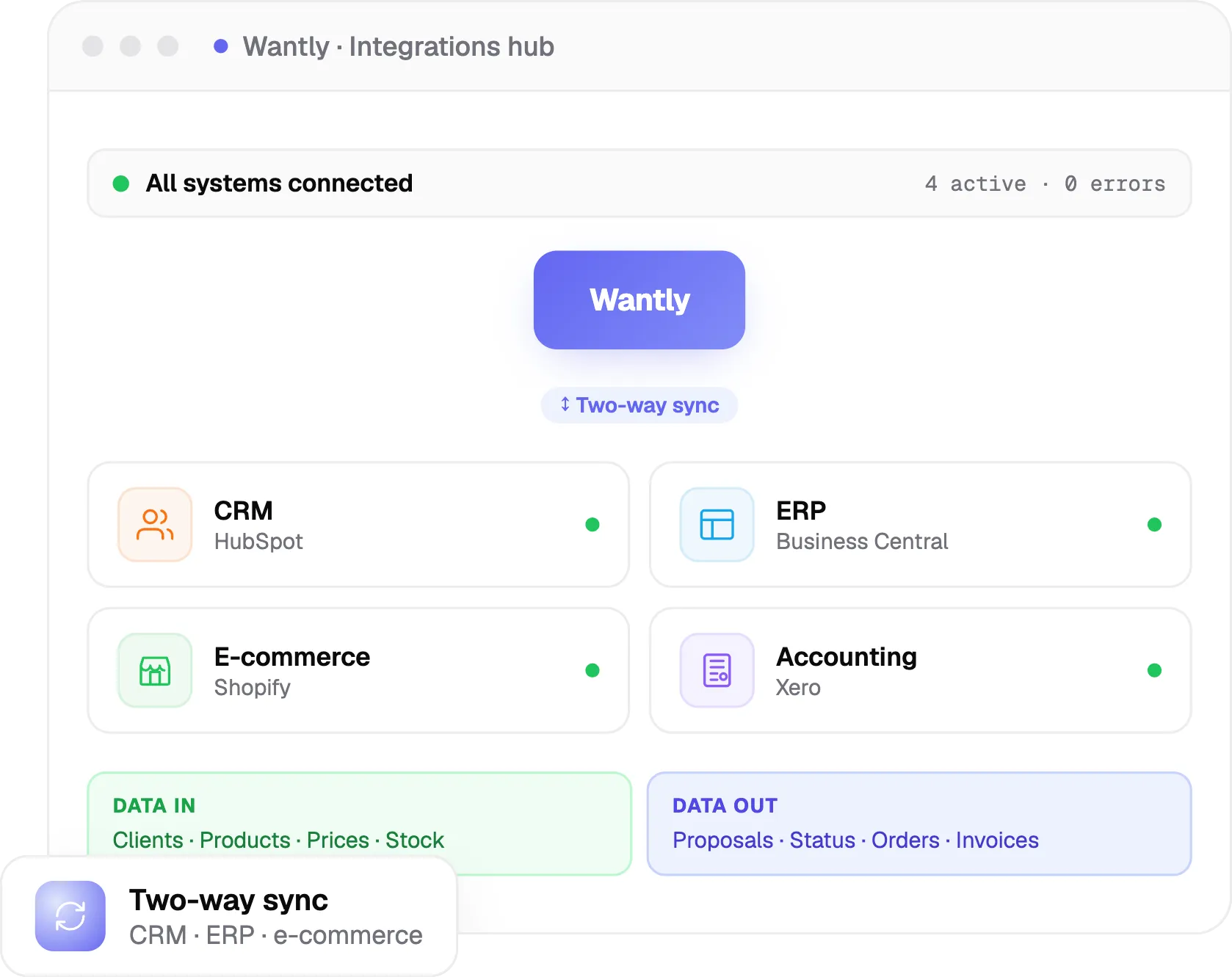
integrations hub

Trusted by teams who want one connected flow

gutta-werke logo
dserve-logo
megaomas logo
aka-baltic logo
alwark logo
profruit-logo
tenesys logo
mprekyba logo
eurohorecana logo
hegvita logo
lematics logo
zereda logo
baltneta logo
tegra logo
medita logo
extreme-delight logo

From distributors and wholesalers to manufacturers — plus any system with an API.

70+
companies quote daily
from a connected stack in Wantly
2-way
CRM and ERP sync
data flows in and proposal status flows back
~3 wks
to go live
we connect everything during setup
The cost of a disconnected stack

Your tools don't talk, so your team retypes everything.

Supplier data in one place, products and stock in the ERP, your e-shop in another, client data in the CRM, the proposal somewhere else. Every quote means copying between systems, and every copy is a chance for an error.

Retype client data from the CRM into every proposal
Products, prices, and stock drift out of sync
Won deals re-entered into the ERP by hand
Proposal status never makes it back to the CRM

What staying manual quietly costs you

Wasted hours
Copying the same data between systems.
Costly errors
Numbers re-typed by hand go wrong.
Stale data
Quotes built on out-of-date prices and stock.
1
Connect your CRM

Two-way sync with your CRM

Connect HubSpot, Pipedrive, Salesforce, Microsoft Dynamics 365, Bitrix24, Scoro, and more. Client, contact, deal, and product data flow into Wantly, and the proposal link, status, open and confirm signals, final amount, and won or lost result flow back, so your CRM always reflects reality.
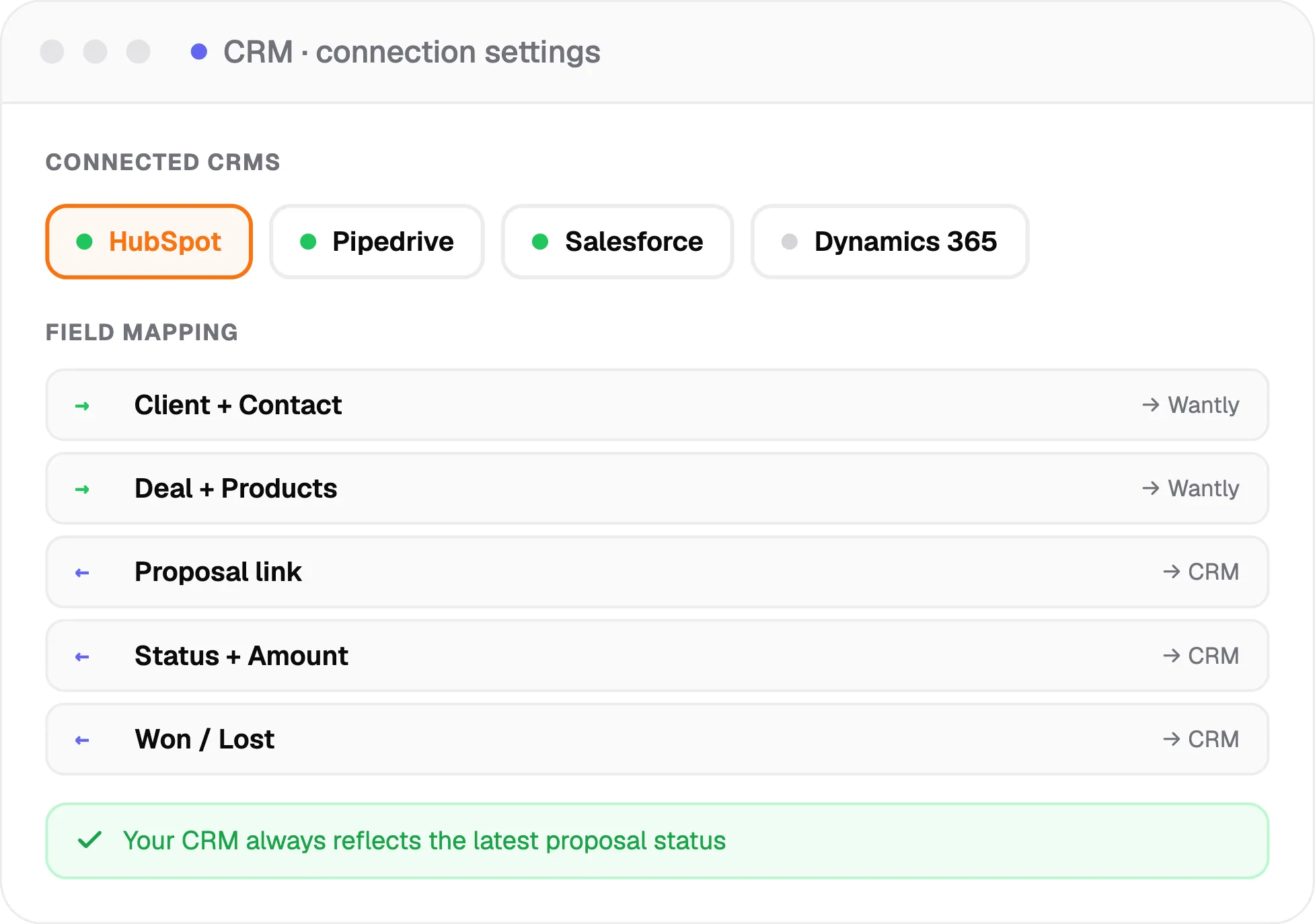
HubSpot, Pipedrive, Salesforce, Dynamics 365, Bitrix24, Scoro, and more
Client, contact, deal, and products flow in
Proposal link, status, amount, and win or loss flow back
crm
2
Automate the busywork

Let the proposal flow run itself

Turn manual steps into automatic ones. Create a proposal when a deal changes stage, pass the client data across, write the proposal link back to the CRM, create a task when the client opens it, move the stage when they confirm, and set a follow-up reminder — all without anyone lifting a finger.
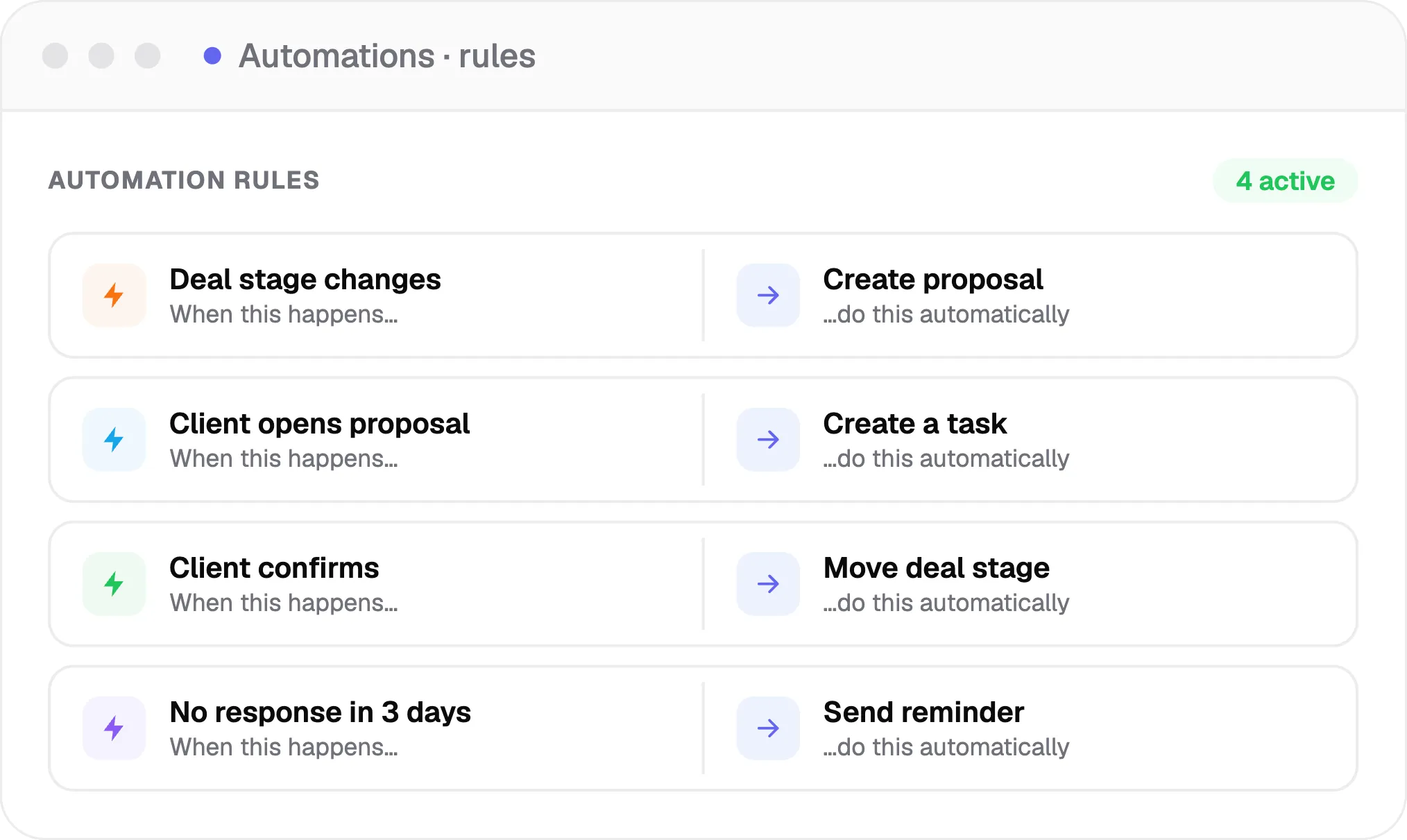
Create a proposal on a deal-stage change
Task on open, move the stage on confirm
Automatic follow-up reminders
automation rules
3
Sync ERP, e-commerce & warehouse

ERP, e-commerce, accounting, and warehouse — in sync

Pull products, prices, costs, and stock from your ERP, warehouse, or e-commerce platform (Shopify, WooCommerce, Magento, PrestaShop), push the approved order straight back, and issue invoices through your accounting system. Connects to ERPs like Microsoft Dynamics 365 Business Central and Odoo, accounting like Visma, Sage, and Xero, and more.
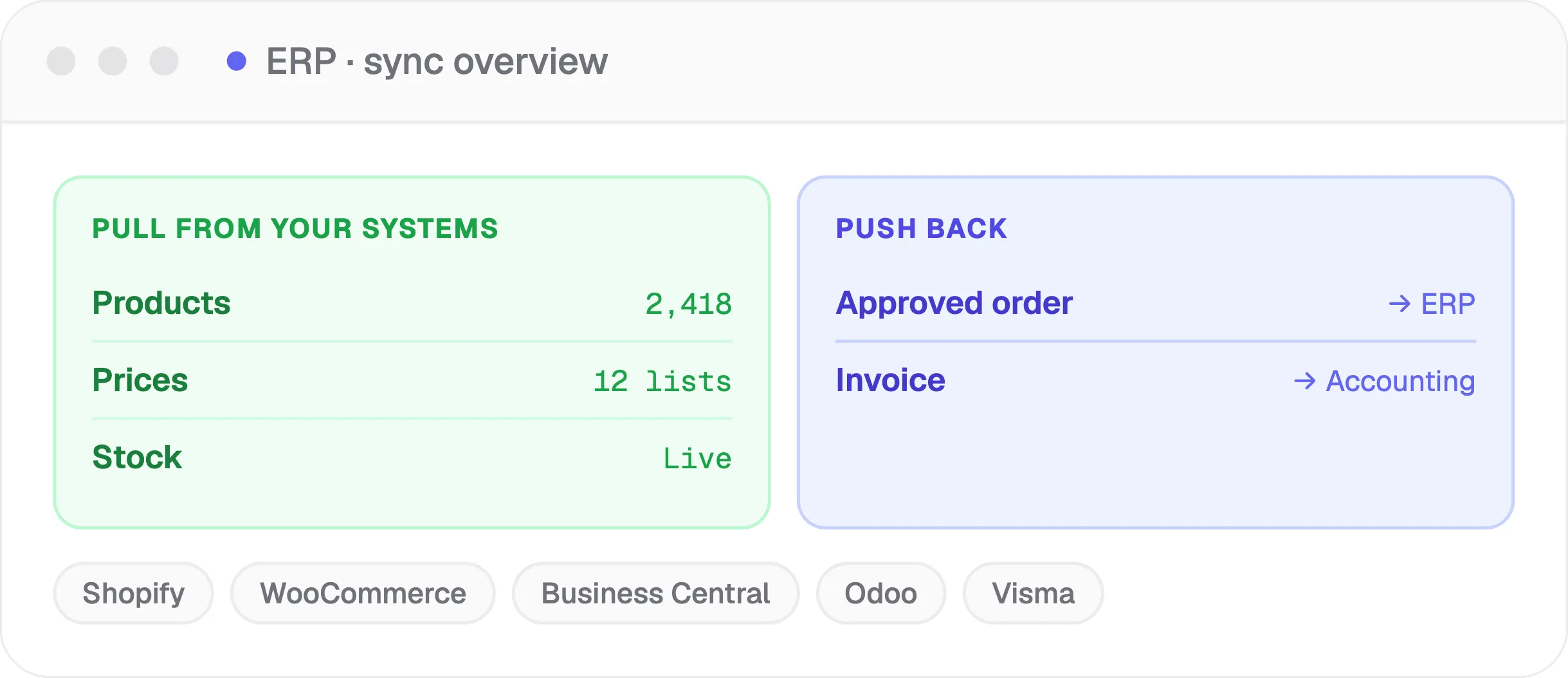
Pull products, prices, stock from ERP, warehouse, or e-shop
Push the approved order, and issue invoices through accounting
Shopify, WooCommerce, Business Central, Odoo, Visma, and more
ERP sync
4
Build with the API

A full API — and we connect anything that has one

When you need more than the standard connectors, the API does it: create proposals, pass clients and products, update prices, read status and confirmation, and trigger automations. And whatever system you use, if it has an API, we connect it for you during setup, so you are never blocked by 'we don't integrate with that'.
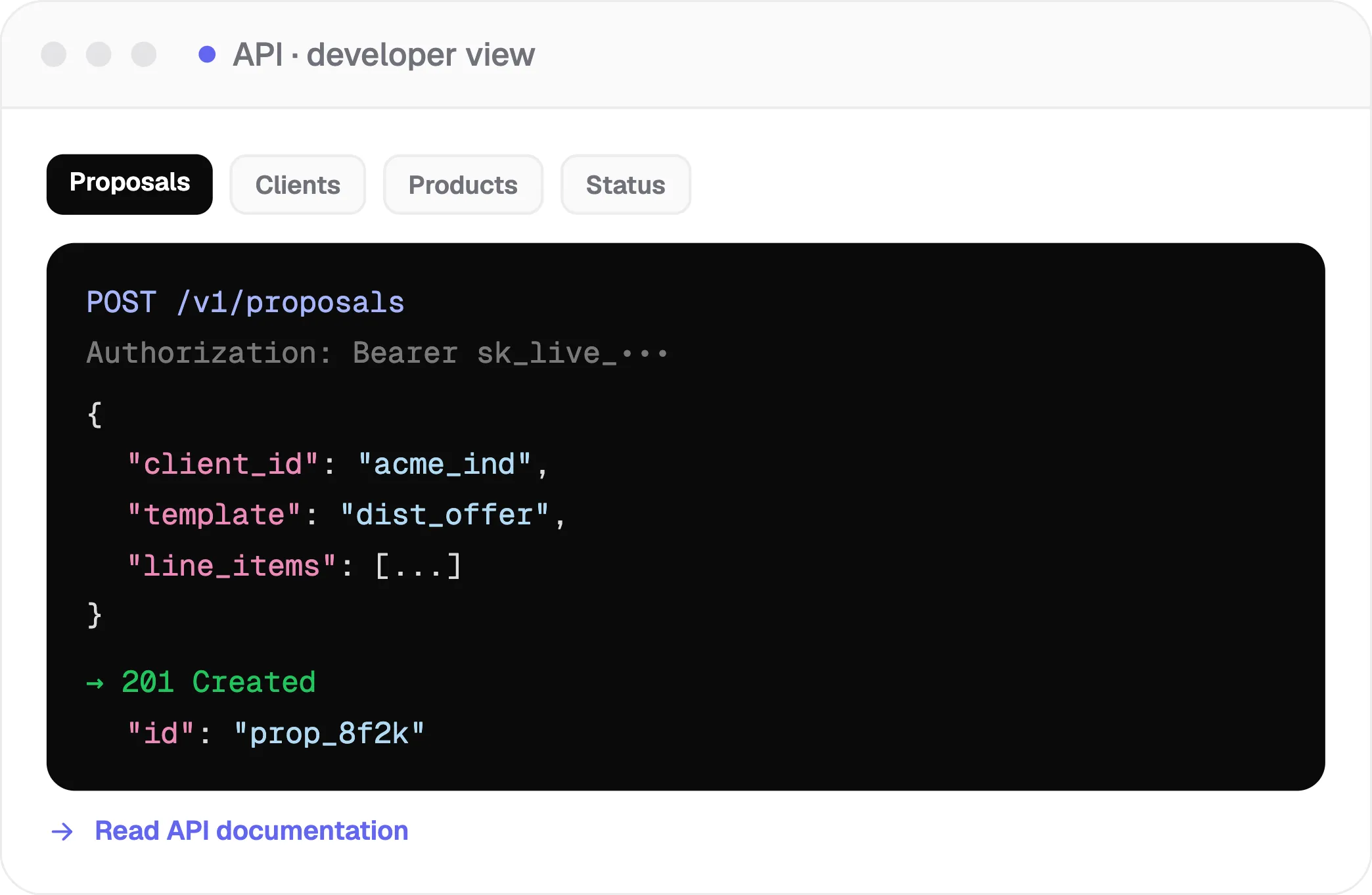
Create proposals, pass clients and products, update prices, read status
Trigger automations and build custom integrations
Any system with an API — connected for you during setup
Read API docs
API
5
One automated flow

From CRM deal to ERP order, automatically

Put it together and the whole chain runs end to end: supplier data flows in, a deal in your CRM becomes a Wantly proposal, the client approves and signs, the order lands in your ERP and the invoice is raised, and you can feed your resellers from the same catalog — with nothing re-keyed along the way.
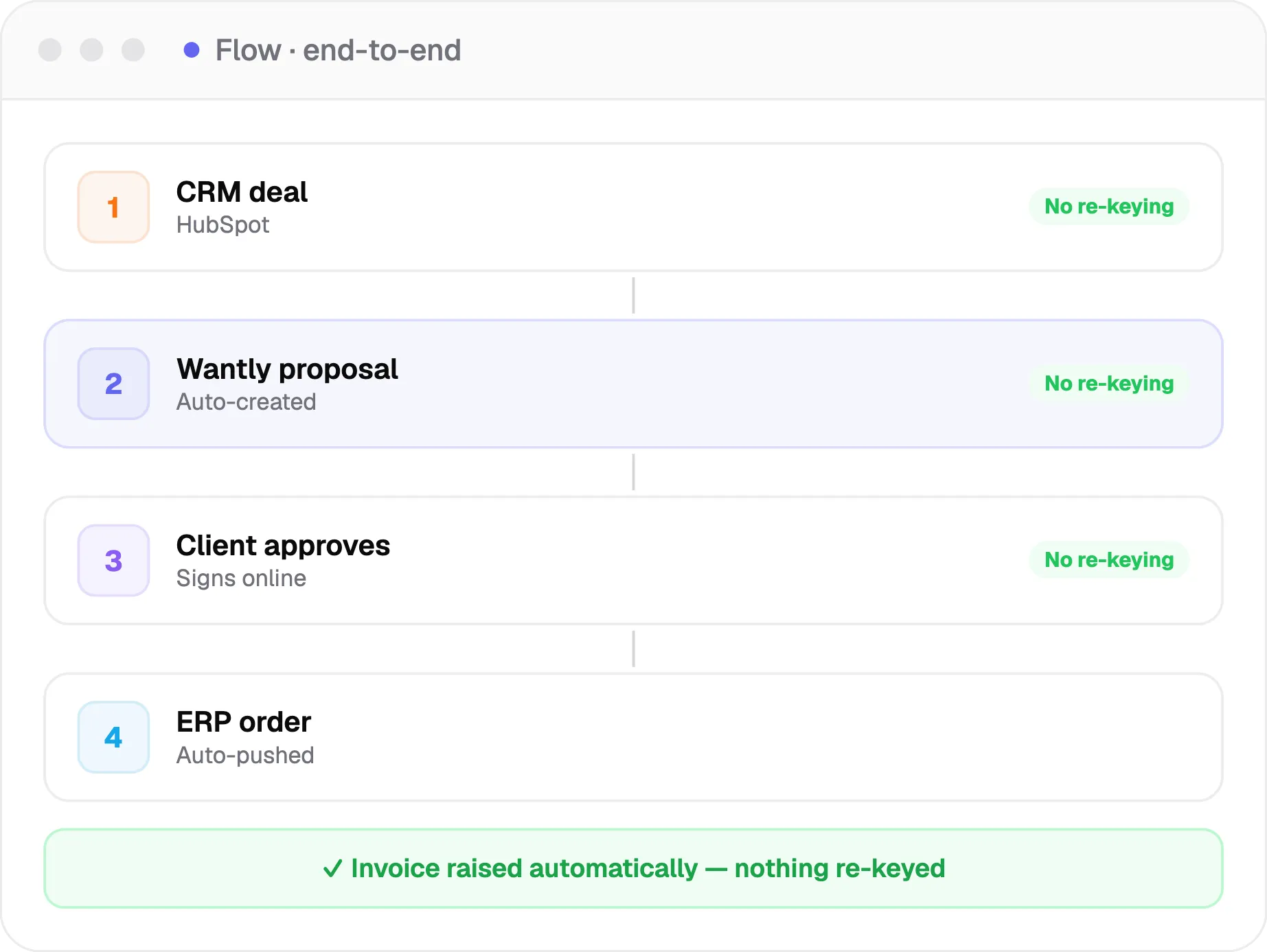
CRM deal becomes a Wantly proposal automatically
Client approves and signs in the proposal
Order lands in your ERP and the invoice is raised — nothing re-keyed
flow
More capabilities

More about connecting Wantly

Everything else that makes Wantly fit your stack.

3
Push status to your CRM
Open, viewed, confirmed, won, and lost written back.
SentOpenedSigned
Create the ERP order
Client, products, quantities, and final price on approval.
RepStatusValue
Live products & stock
Products, prices, costs, and stock from your ERP.
Client price lists
Per-client price lists synced from your systems.
Issue invoices
Create invoices automatically via your accounting or ERP integration.
Expires 2d
Webhooks & triggers
Kick off automations when something happens.
+
Custom & private integrations
We connect Wantly to your in-house systems.
CSV
Done-for-you setup
We connect your whole stack during onboarding.
Import from suppliers
Any-format and link-to-product import (see Product Catalog).
Integrations

Connects up and down your chain

Suppliers, CRM, ERP, e-commerce, accounting, warehouse, email, and your resellers — plus any other system with an API, connected for you during setup.

HubSpot
Salesforce
Business Central
Shopify
WooCommerce
API
And many more

Every signal in your CRM

Opens, views, and confirmations flow into your CRM through our open API — tasks get created and deal stages move on their own.

Create a task when a client opens
Move the deal stage when they sign
Write final amounts back to the CRM
View API docs

See how the catalog, pricing, proposal editor, tracking, and e-signature use this connected data. Or see everything Wantly does in one place.

Current way vs the Wantly way

From a disconnected stack to one connected flow

Today (tools that don't talk)
Retype client data from the CRM
Products and stock out of sync
Won deals re-entered into the ERP by hand
Status never updates in the CRM
Errors from copy-paste between tools
With Wantly
Client data flows in from the CRM
Live products, prices, and stock from the ERP
Approved orders pushed to the ERP automatically
Status written back to the CRM
No double entry, fewer errors
Outcomes

What a connected stack changes

No double entry

Data flows once, not typed three times.

Fewer errors

Nothing re-keyed means nothing mistyped.

A faster flow

Deals move from CRM to order on their own.

Objection handling

The honest answers to what you're thinking

We use a CRM you might not list.
Beyond HubSpot, Pipedrive, Salesforce, Dynamics 365, Bitrix24, and Scoro, we connect to any system that has an API, and we build that integration with you during setup. You are not limited to a fixed list.
W
Will this disrupt our ERP?
No. Wantly reads what it needs and pushes approved orders. We scope and set it up with you so it fits your existing process, not the other way around.
W
We don't have a developer.
You do not need one. We connect your stack for you during onboarding; the API is there if your team wants to build more later.
W
Proof

A distributor running HubSpot and an ERP used to retype every won deal into both systems. Wantly connected the two during onboarding in about three weeks. Now a deal in HubSpot becomes a Wantly proposal, and the approved order lands in the ERP automatically, with no one copying data between screens.

0

double entries per deal

~3 wks

to go live, done for them
"A deal in our CRM turns into a proposal, and once it is signed the order is already in the ERP. We stopped retyping the same thing three times."
Every Wantly setup is done for you
1
We connect your CRM, ERP, and tools
2
We import your products and price lists
3
We train your team
4
You just start quoting from one connected flow
Live in ~3 weeks. No developer required.
Testimonials

What teams say about integrations

A deal in HubSpot becomes a proposal on its own. No more copy-paste.

tr
Tomas Reinhart
Sales Manager, distributor

The approved order lands in our ERP automatically. That alone saved hours.

ik
Ieva Kazlauskaite
Operations Lead, manufacturer

We connected our own system through the API in days, not months.

mv
Martin Voss
CTO, equipment seller

FAQs

Answer-first questions about Wantly integrations and API. Talk to us →

Which CRMs does Wantly integrate with?

Does Wantly replace our CRM?

Can Wantly connect to our online store?

Is the integration two-way?

Can it create the order in our ERP automatically?

Can Wantly issue invoices?

Does Wantly have an API?

Do we need a developer to set this up?

Who is this for?

How long does setup take?

Show 4 more questions
Show fewer questions